Notes, checklists & notebooks
Fast text notes and checklists organised into notebooks, with stored files, trash and restore.

Notes, drawings, boards, PDFs, media, reminders and projects in one app for Windows and Android.

Video coming soon
Step-by-step videos for every feature, on our YouTube channel.
Write, sketch, collect, plan and record in one notebook, in place of five separate apps. It works offline, and your data stays yours.
Fast text notes and checklists organised into notebooks, with stored files, trash and restore.
Layers, brushes and precise control. Free includes simple drawing with brush, eraser, size, opacity and symmetry.
Open canvas notes plus boards to pin images, clues, links and ideas and connect them visually.
Open, view, edit and print PDF and .docx documents, turn screenshots and photos into one PDF in the order you choose, and work in spreadsheets with formulas that open and save .xlsx and .csv files, all inside your notebook.
Image, video and audio notes, a built-in media player, screenshot studio and screen recording.
Record ideas, meetings and lectures straight to MP3 or WAV and keep them with your notes.
Set reminders that ring as real alarms, so important things are not missed.
Track time against projects, then turn the hours into invoices. Calculator and dictionary included.
One switch disconnects the app from the internet completely, including sync, AI and our own licence check. While it is on, nothing can leave your device.
Cloud sync from one of your devices straight to the other, with nothing kept on our server and no limit on the kind of file: 15 GB every 30 days at your connection’s full speed. Also an AI chat assistant, custom fonts, folders and multi-select.
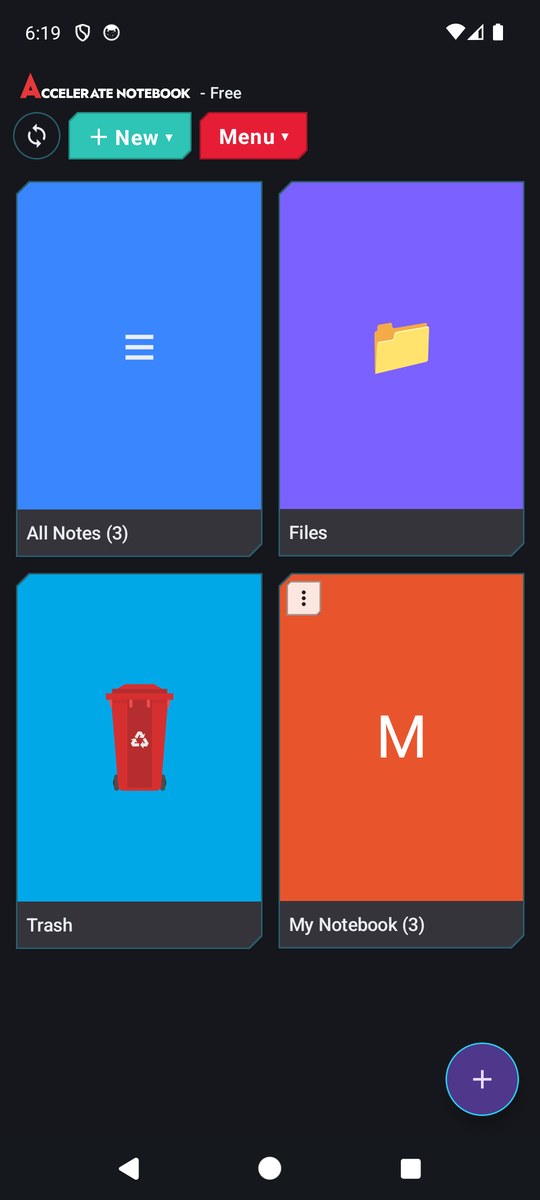
The free edition is a complete notebook on its own. Upgrade only when you want the studio tools.
The same notebook and the same interface, sized for whatever you are working on. These are real screenshots of the current build, not design mockups.

Every line below is checked against the current build, feature by feature. The free edition runs on Android and Windows; Premium adds the rest, on 2 devices.
| Feature | Free | Premium |
|---|---|---|
| Writing and the basics | ||
| Only-text notes with bold, italic, underline, strike-through | ||
| Text colour, highlight, alignment and bullet lists | ||
| Font and size picker, 110 bundled fonts | ||
| Page colours for a note | ||
| Checklists | ||
| Notebooks to group notes | ||
| Pin a note, colour a note | ||
| Tabs: several notes open at once | ||
| Trash with restore | ||
| Stored files (the Files tile) | ||
| Note search | ||
| Stopwatch | ||
| Folders inside notebooks | ||
| Emoji in the editor | ||
| Custom fonts you install yourself (.ttf / .otf) | ||
| Spelling and grammar check, with language choice | ||
| Graphics library | ||
| Choose which editor the round + button opens | ||
| Note types | ||
| Simple drawing: brush, eraser, size, opacity, symmetry | ||
| Rich text pages that also hold images and attachments | ||
| Free Page: an open canvas you lay out yourself | ||
| Mind maps, laid out on the evidence board | ||
| Evidence board and mood board | ||
| Image notes | ||
| Video notes | ||
| Audio notes | ||
| File notes: keep any file with your notes | ||
| PDF viewing | ||
| PDF editing | ||
| Make one PDF from your screenshots and photos, pages in the order you choose | ||
| Print on any printer: drawings, pictures, PDF and .docx files (in their full layout) and Only text notes | ||
| .docx viewing | ||
| .docx editing and export | ||
| Spreadsheets with formulas: open, edit and save .xlsx and .csv | ||
| Hyper Canvas (Beta) | ||
| Layers | ||
| Shapes | ||
| Full colour picker, eyedropper and fill | ||
| Place an image inside a drawing | ||
| Export a drawing as an image | ||
| Capture and media | ||
| Voice recording to MP3 or WAV | ||
| Dictation: speak, and get text | ||
| Screenshot studio | ||
| Screen recording | ||
| Built-in media player | ||
| Plan and work | ||
| Reminders that ring as real alarms | ||
| Clock | ||
| Projects and tasks | ||
| Time tracking against a project | ||
| Invoices | ||
| Analytics | ||
| Calculator | ||
| Dictionary | ||
| AI chat, using your own provider key | ||
| Security and privacy | ||
| Password-locked notebook | ||
| Internet kill switch: blocks sync, AI and the licence check | ||
| Works fully offline | ||
| Lock now, change or remove the password | ||
| Recovery code | ||
| Sync, backup and licence | ||
| Backup now and restore from backup | ||
| Sync over your own network | ||
| Sync by USB cable | ||
| Protected transfer file between devices | ||
| Import a package exported from another device | ||
| Cloud sync, 15 GB every 30 days | ||
| Cloud sync included with a Lifetime licence | ||
| One licence on any 2 devices: two Windows PCs, two Android devices, or one of each | ||
| Look and feel | ||
| Sci-fi interface on every screen | ||
| Themes: Default, Light, Dark | ||
| Themes: Brown, Navy and your own custom colours | ||
| System monitor panel An extra; readings depend on your hardware | ||
| RGB glow border | ||
| Window corners and title-bar style (Windows) rounded corners need Windows 11 | ||
Scroll inside the table to see all 72 rows.
Free: Android as an APK download, Windows as a direct download. Nothing in the free edition expires.
The system monitor panel is an extra, not part of what the notebook does: it reads CPU, memory and network counters from your own machine, and on some hardware, drivers or Android versions those readings may be partly unavailable, wrong, or not appear at all. Buy Premium for the notebook features, and treat the monitor as a bonus that may or may not work properly on your device.
Every plan includes all Premium features on any 2 devices at a time: two Windows PCs, two Android devices, or one of each.
Cancel at any time; access continues to the end of the period. Subscribe now and keep this price for as long as your subscription stays active.
Twelve months for the price of ten. The best value for ongoing use. Subscribe now and keep this price for as long as your subscription stays active.
Own the app forever, with cloud sync included.
Premium does the work of several paid apps at once. This is the lowest yearly price we found for each kind of app, for one person.
| Instead of | Lowest price elsewhere | In Premium |
|---|---|---|
| An office suite for documents and spreadsheets | from $69.99 / year | Editing and exporting .docx documents, and spreadsheets that open .xlsx and .csv files |
| A PDF editor | from $89.99 / year | PDF viewing and editing |
| A notes and projects workspace | from $84 / year | Rich notes, notebooks, projects and tasks |
| An online whiteboard for mood boards | from $96 / year | Free Page canvas, evidence boards and mood boards |
| A mind-mapping app | from $42 / year | Mind maps on the evidence board: cards and pictures joined by strings |
| A drawing app with layers | from $24.99 / year | Hyper Canvas (beta) with layers, shapes, fill and eyedropper |
| A screenshot and screen-recording tool | from $39 / year | Screenshot studio and screen recording |
| A to-do list with reminders | from $49.99 / year | Tasks, and reminders that ring as real alarms |
| A time tracker with invoicing | from $65.88 / year | Time tracking against projects, and invoices from the hours |
| Together | from $561.84 / year | $70 / year, or Lifetime at $225 once. 2 devices included. |
The lowest yearly price for one person among popular paid apps of each kind, in US dollars, as listed on their own websites on 2 October 2026. Prices change, and each of those apps does more in its own field than the job named here.
Enter STUDENT20 or TEACHER20 at checkout for 20% off any plan.
The amounts above are in US dollars.
Secure checkout. Local VAT and sales tax are calculated at checkout. 14-day refund policy.
No account needed. Install the free edition and keep it as long as you like.
For phones and tablets running Android 8.0 or newer. Download the free app here, or from the Builds menu above. Accelerate Notebook is coming to Google Play as well.
Desktop app for 64-bit Windows 10 and Windows 11. The free app is portable: download it and run it.
Buying Premium? Your licence key arrives by email right after purchase. Run the Premium installer for Windows or Android and enter the key.
Downloading from this website? Windows may show a SmartScreen warning (“Windows protected your PC”), your antivirus may block the app, and Android asks you to allow installs from unknown sources. These warnings appear because the app is new, not because anything is wrong with it.
The Windows download is portable: there is nothing to install. If your antivirus blocks it, add Accelerate Notebook to its exclusions. Step by step, and why it happens.
Your notes belong to you. There is no tracking, no telemetry and no advertising, in the free app or in Premium. We never collect or read what you write: our servers only see a Premium licence check and whatever you choose to sync.
Your notebook lives on your device and works fully offline.
Only your password opens your notes.
Anything you sync is encrypted first, and our server keeps no copy.
Sync stays off until you turn it on.
One switch cuts the app off the internet completely, including our own licence check.
The app runs offline every day. On a monthly or yearly plan it needs an internet connection only about once a month, to confirm your licence. The check runs quietly in the background and takes a moment; if you go online once a month, you will not notice it. A Lifetime licence asks only after 90 days without one.
If a plan cannot check in for 30 days, the app starts reminding you, and in the last few days it says plainly that access is about to pause. If the check-in is missed entirely, Premium features pause until you connect once. Nothing is deleted and nothing is uploaded, and your notes reopen as soon as you reconnect.
A subscription also runs to its own billing period, and the app always shows how many days are left, so nothing expires without warning.
When a plan ends, you get 15 days of read-only access, on monthly and yearly plans alike. Every note still opens and exports; editing and cloud sync need an active plan. After those 15 days the app locks until you renew. Nothing is ever deleted: renew and everything is back exactly as you left it.
A switch in the toolbar disconnects the whole app from the internet. While it is on, nothing leaves your device: no sync, no AI, no update checks, and not even our own licence check. Most software can contact its makers whenever it likes; this switch leaves that decision with you.
There is one trade-off: a licence that cannot check in eventually pauses. When the app asks, turn the switch off for a moment, then turn it back on.
Order the seats you need in one go, pay on a single invoice, and move a seat to a different person as your staff and students change.
| Seats | Yearly | |
|---|---|---|
| 1–9 | $70.00 | |
| 10–49 | $66.50 | 5% off |
| 50–99 | $63.00 | 10% off |
| 100+ | $59.50 | 15% off |
Per seat, before local tax. The discount is taken off the order total, and the total is rounded down to the whole dollar. Lifetime is $150 per seat (regular price $225) at every quantity, and includes seat changes and priority support instead.
From 10 seats upwards, each seat can be moved to a different person every 180 days, on any plan, by you in your account, without asking us. Need it sooner, or have fewer than 10 seats? Ask, and we will move it for you.
Need a purchase order or a quote first? Email us and we will invoice your institution directly.
Cloud sync sends your notebook straight from one of your devices to the other through our server, which passes it on as it arrives and keeps none of it, so it is a sync, not an online backup. Both devices need to be open at the same time: press “Receive from my other device” on one and “Send to my other device” on the other, in either order. If the receiving device has work the other one does not, nothing is lost: you choose to keep both copies of a note changed on both devices, each tagged with its device’s name and the date and time, or to merge them into one. When the server is busy, nobody is turned away: your sync waits its turn and the app shows your place in the queue. No kind of file is slowed: notes, drawings, documents, photos, recordings and videos all go at whatever speed your connection gives. Fair use: you get 15 GB every 30 days at full speed, counted from the day you first activate, with your two devices counted together; receiving uses up none of it. Every new 30-day period starts with a fresh 15 GB. Past the 15 GB, cloud sync runs under our current fair usage policy until your next period starts (at present a slower, steady speed of about 1 GB per hour), so one very large library cannot take the service away from everyone else. We may change this policy; this page always describes the current one. The app’s cloud sync screen shows how much of your 15 GB you have used, when your fresh 15 GB starts, and the speed in force. A sync sends your whole notebook each time, so a 1 GB notebook synced once a day uses the 15 GB in about two weeks. If the connection drops during a sync, it carries on from where it stopped by itself. A sync you stop yourself starts afresh next time, with everything you have added since. In the app’s cloud sync screen you can also switch photos, audio or video off entirely for a sync: what you leave out simply stays on that device, and the other device keeps its own copies. A notebook of any size can always be transferred over your own network, by USB cable or by file at full speed, with no allowance at all.
Yes. The warning is a false alarm. Accelerate Notebook is new, and Windows and antivirus programs are careful with programs they have not seen many times before. The way the download is sealed to protect it from copying can also look unusual to them. Android asks you to allow installs from unknown sources for any app that does not come from Google Play.
Accelerate Notebook is coming to Google Play; once it is there, getting it from Google Play avoids these warnings on Android. If you download it from this website and your antivirus blocks it, add Accelerate Notebook to the exclusions in your antivirus. Why it happens, and how to open the app anyway.
Every Premium feature on Windows and Android, including cloud sync (15 GB every 30 days at full speed), for as long as your plan is active. Lifetime keeps every feature forever, and includes cloud sync.
One licence works on 2 devices at a time, in any mix: two Windows PCs, two Android devices, or one of each.
Windows: Windows 10 and Windows 11, 64-bit. It is the same app on both, with one exception: rounded window corners need Windows 11, because Windows 10 has no way to round an app’s window. Everything else works the same.
Android: Android 8.0 (Oreo) or newer, on phones and tablets. The free edition downloads as an APK from the Builds menu, and Premium as an APK with the link in your licence email; both are coming to Google Play, and need the same Android version there.
Move your notes across with sync or an exported package, then activate the same key on the new device. Your licence covers 2 devices, and you can move it to a new device yourself once every 180 days. Need it sooner, or is the old device lost or broken? Contact support@acceleratesoftwares.com and we will free up a slot.
For 15 days the app goes read-only: every note still opens, and export still works, so you can take your data with you at any point in that window. Editing and cloud sync stop. After 15 days without renewing, the app locks until you renew. Nothing is deleted, and renewing brings everything back exactly as you left it.
The app needs no account: there is nothing to create or sign into before you use it, and the free edition never asks for one. Buying Premium does: when you press Buy, you make an Accelerate account with your email and a password and confirm the email, or sign in to the one you have, and the checkout opens right after. My Account keeps your licences, receipts and devices in one place, and it stays yours even after a subscription ends. A monthly or yearly plan renews itself on the card you paid with, and your receipt email from our payment provider has the link to change that card, pause or cancel.
If a plan has already lapsed, open Notebook and press Renew my subscription on the screen it shows you. That opens this page with your licence key attached, so the payment lands on the licence you already have: same key, same two devices, same notes, and no second key to keep track of. You can also buy the same plan again, signed in to your account, and tick I’m renewing a licence I already have. Either way, reopen the app once the payment goes through and it unlocks at its next check-in.
A one-time payment gives you the Premium app forever on 2 devices, with cloud sync included. The regular price is $225; the price shown on the card above is what you pay today, and whatever you pay is the price you keep. We run occasional offers; when one is on, the price above changes and the saving is shown right on the card. You are never asked to pay to keep using what you bought. Your notes never depend on our server: they live on your own devices, and you can always sync over your own network, by USB cable or by file.
Yes. The first purchase of any plan can be refunded within 14 days. See the refund policy for details.
Yes. Export a package in the free app, then import that package in Premium. Your notes, notebooks and checklists come with you.
Yes. Everything works offline. An internet connection is only needed for cloud sync, AI chat and occasional licence check-ins.
On your own devices. Cloud sync passes your notes straight to your other device, and our server keeps no copy. See our privacy policy.
Day to day, no: everything works offline. A lifetime licence checks in silently whenever your device is online, to confirm it is still valid; you will not notice it. Only if it goes 90 days without being able to does the app ask you to connect once, and Premium pauses until it has. Your notes are never deleted or uploaded, and everything reopens as soon as you reconnect. A monthly or yearly plan follows its billing period instead, and always shows the days remaining; when it ends, the app stays readable for 15 days, long enough to export anything you want, and then locks until you renew.
There is also an internet kill switch in the toolbar. Turn it on and the app cannot reach the internet at all: not for sync, not for AI, and not for our licence check either. It is a real switch, not a setting we can override; the only consequence is that a licence which never checks in will eventually pause, so turn the switch off briefly when the app asks.
Not necessarily, and that is deliberate on this page rather than a surprise later. The system monitor is an extra bolted onto the app: it reads CPU, memory and network counters from your device. Those counters differ between machines, drivers, Windows builds and Android versions, so some readings can be missing, wrong or stuck at zero, and on a few devices the panel may show nothing useful at all. It can be switched off, and nothing else in the notebook depends on it. Please buy Premium for the notes, editors, media and sync, not for the monitor.
Checkout is handled by our authorised reseller, who is the Merchant of Record for every order. They take the payment securely, calculate and remit the VAT or sales tax for your country, and can help with billing enquiries and returns. You will see exactly who they are on the payment screen and on your receipt.
Start free today, or unlock every tool on 2 devices from $7 a month.